Learner guide
Your guide to planning your degree
How to set up the FRAME portal, read your Flowriculum and turn it into a plan your college can act on. Setup takes just a few minutes.
Before you start
Have these nearby. You don't need all of them, but the more you have, the more accurate your plan will be.
- The school and program you want to finish at. If you're deciding between schools, pick one to start; you can compare others later.
- An unofficial transcript from any college you've attended, so you can count the credits you've earned and see which courses you've finished.
- Any exam scores you already have, such as CLEP, DSST or AP.
- Other learning that might count: military training (your Joint Services Transcript), workplace training or professional certifications.
- Rough costs: whether you'd pay in-state or out-of-state tuition, and any scholarship, grant or employer tuition help.
1. Start your free trial
Click Start your free trial and create your account with your name, email and a password. The first time you sign in, you'll be asked how you'll use the portal.
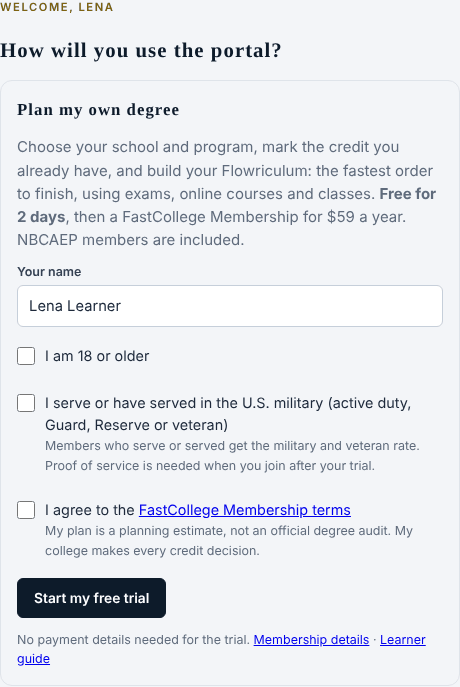
Military or veteran? Tick the box for U.S. military service (active duty, Guard, Reserve or veteran) on this screen to get the military and veteran rate when you join.
Your free trial lasts 48 hours, and you don't need to enter any payment details. A bar at the top of every page shows how much time you have left. We'll also email you a short welcome with these steps, and a reminder a few hours before your trial ends.
Working with an NBCAEP advisor or school? Choose the second option instead. Your advisor links your sign-in to your student record and builds your plan with you, so you don't need a FastCollege Membership.
2. Set up your details
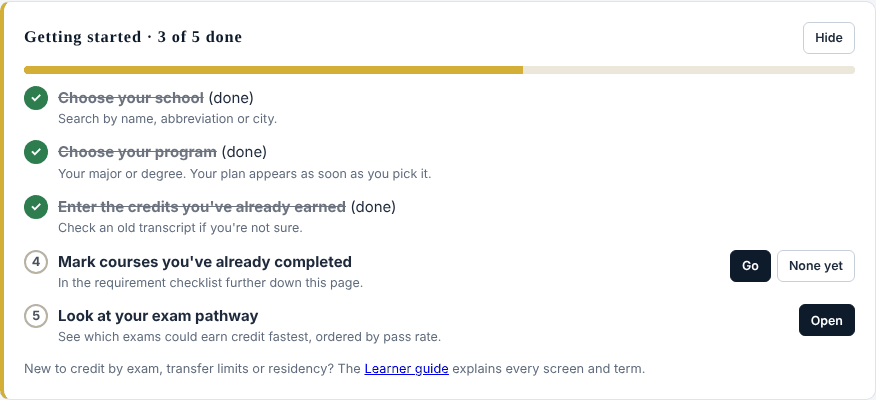
You'll land on My Flowriculum. A Getting started checklist at the top walks you through setup and ticks each step off as you go. Press Go on any step to jump to the right place.
Then fill in My details:
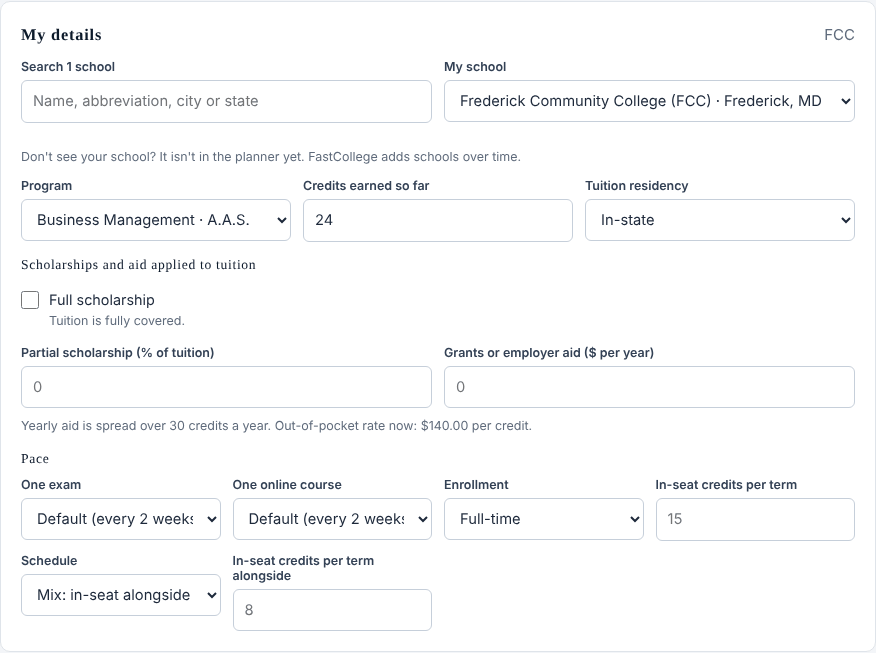
- My school: type part of the name, an abbreviation or a city, then pick it from the list. If your school isn't listed, email support@fastcollege.org and ask us to add it. Once it's added, we'll add two days to your trial so you don't lose any time.
- Program: your major or degree. Programs are grouped by level (associate, bachelor's, master's and so on). Your plan appears as soon as you choose one.
- Credits earned so far: the total college credits you already have, from your transcripts. If you have none yet, leave it at 0.
- Tuition residency: in-state or out-of-state. This sets the tuition rate used in your cost estimates.
- Scholarships and aid: tick Full scholarship if tuition is fully covered, or enter a partial scholarship percentage or yearly grant or employer aid. This only changes the out-of-pocket estimate.
- Pace: how long one exam and one online course usually take you (leave them on Default if you're not sure), whether you're full-time or part-time, and how many in-seat credits you take each term. Be honest here; a pace you can keep beats a fast plan you can't.
- Schedule: Mix takes in-seat classes alongside your exams and online courses. Exams and online first finishes those before you start classes.
3. Read your Flowriculum
Your Flowriculum is every requirement you still need, put in the order that gets you to your degree fastest. Four numbers sit at the top:

- Credits still needed for your degree, after what you've earned and what's in progress.
- Time to finish at the pace you set, with an estimated finish month.
- Time saved compared with taking every remaining requirement as a class.
- Tuition avoided by earning credit through exams and other accepted options instead of your school's courses.
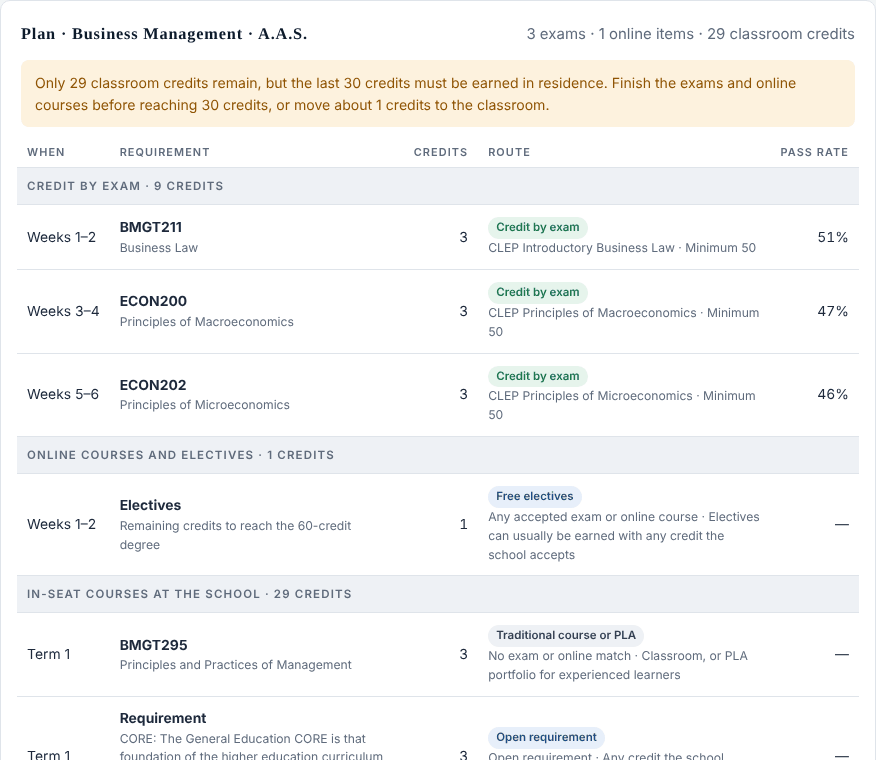
Below that, the plan table lists each requirement in order, grouped into three phases: credit by exam, then online courses your school accepts, then classroom courses at your school. Each row shows when to do it, how many credits it's worth, how you'd earn it and, for exams, the national pass rate.
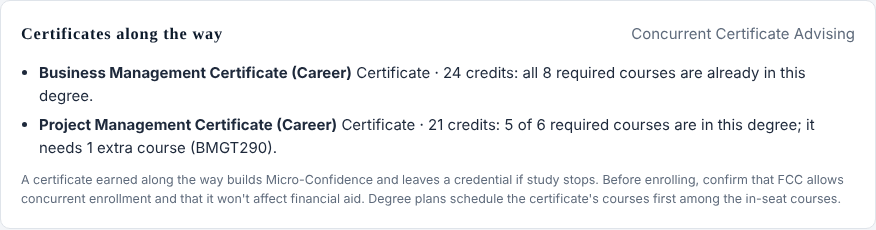
Certificates along the way. Under the plan table, you may see certificates at your school whose courses are already part of your degree, or need just one extra course. Earning one on the way builds Micro-Confidence and gives you a credential even if you pause your studies. Ask your school whether you can enroll in the certificate at the same time and whether it affects your financial aid.
Watch for notes in yellow above the table. They flag things like credits on your record that aren't matched to a requirement yet, credit over your school's transfer limit, or the rule that your last 30 credits often have to be taken at the school.
4. Mark what you've already done
The Requirement checklist at the bottom of My Flowriculum lists every requirement in your program. Set the status of each one you've already dealt with:
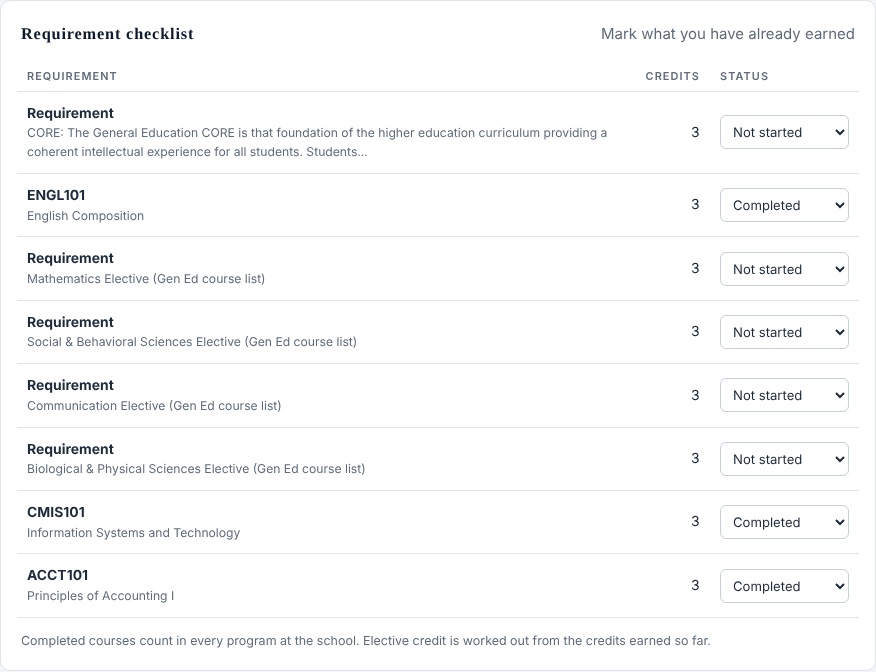
- Completed: you passed this course (or its exam) at this school.
- Transfer credit: you earned it somewhere else and expect it to transfer in.
- In progress: you're taking it now.
- Not started: you still need it.
Go through it with your transcript open. Courses you mark complete count toward every program at that school, so if you switch majors later you won't have to mark them again.
5. Program analysis
Program analysis shows the fastest accepted route through every requirement in a program, and lets you look at any program at any school in the planner, not just your own. Use it to explore before you commit.

The Ways to finish table compares three approaches side by side:
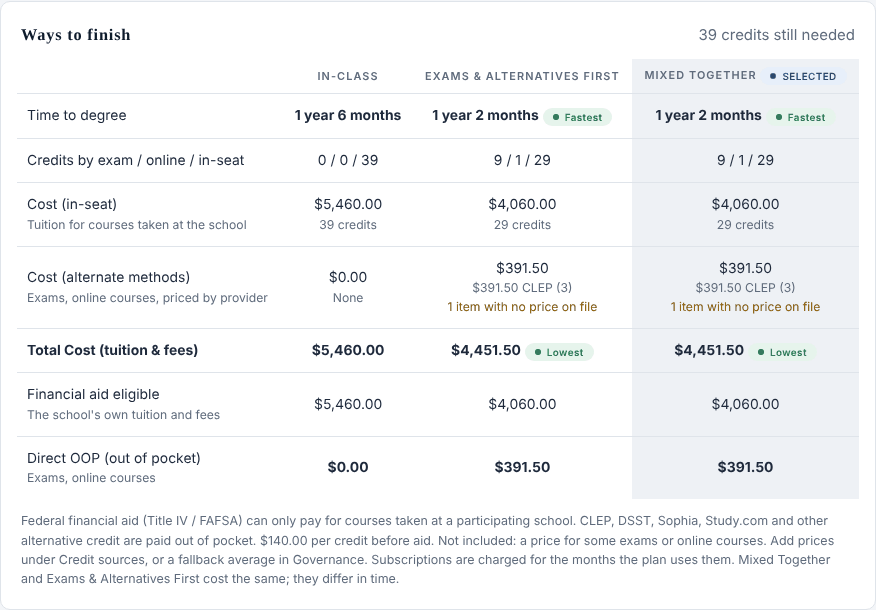
- In-class: every remaining requirement taken as a course at the school.
- Exams & alternatives first: finish exams and accepted online courses, then take classes.
- Mixed together: classes alongside exams and online courses. This is usually the fastest.
Read the note under the table about financial aid. Federal financial aid generally pays only for courses taken at a participating school, so exams and outside online courses are usually paid out of pocket, even though they cost far less.
The What this means section explains the school's rules in plain words: its transfer ceiling, its residency requirement, what it says about CLEP, DSST and other credit, and when NBCAEP last checked that information.
6. Compare schools
Not set on a school yet? Open Compare schools, pick a program, then add up to five schools. You'll see how much of the degree each school lets you earn through exams and accepted online courses, the tuition you'd avoid and the time to finish. Schools differ a lot here, and choosing the right one can save more time than anything else you do.
7. The exam pathway
Exam pathway lists the requirements in your program that you can meet with a national exam such as CLEP or DSST, ordered from the highest historical pass rate to the lowest. Starting with the exams most people pass builds momentum, which we call Micro-Confidence.
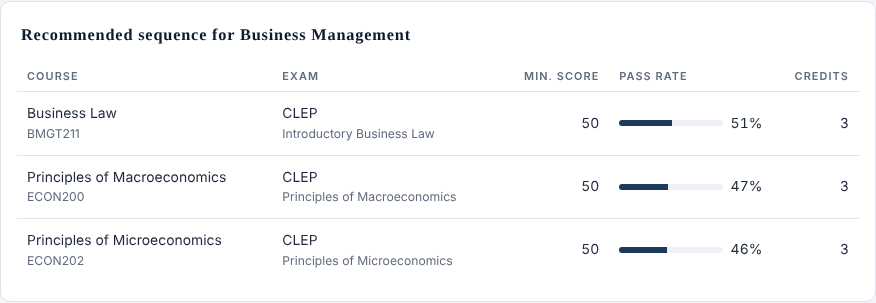
- Min. score is the score your school requires to give credit.
- Pass rate is the share of test takers nationally who reach a passing score. It's a guide, not a promise.
- When you pass an exam, mark that course Completed in your requirement checklist, and have the testing agency send your official score report to your college.
Check before you test. Colleges change their exam policies. Confirm in writing that your school will accept a specific exam for a specific requirement before you pay for it.
8. Take your plan to your college
Your Flowriculum is a planning estimate, not an official degree audit. Your college makes every credit decision, so the last step is always a conversation with your school's advising or transfer office. With FastCollege Membership you can download your plan as a PDF to bring along. Good questions to ask:
- Will the credits on my transcripts transfer, and which requirements will they meet?
- Which CLEP, DSST or other exams do you accept for these requirements, and what score do you need?
- What is your transfer ceiling, and how many credits must I take with you (your residency requirement)? Do the last 30 have to be in residence?
- Do you accept ACE-recommended online courses, military training or a prior-learning portfolio?
- Is there a limit on how many credits I can earn by exam?
- Can you put your answers in writing?
If the college's answer is different from your plan, update your checklist and details. Your plan recalculates right away.
With FastCollege Membership you can also download your plan as a CSV file or press Email me this plan to send a copy to yourself.
9. Your FastCollege Membership
Open My Membership in the menu at any time to see your trial or plan dates.
- During the trial you can use every planning tool. Downloads and email copies of your plan come with the paid plan.
- To keep going, choose Join on My Membership. FastCollege Membership is $59 for 12 months, paid once with PayPal or a debit or credit card. It doesn't renew on its own, so there's nothing to cancel; we'll email you 30 days and 7 days before it ends. Military and veteran members pay a lower rate.
- Gift codes: if someone gave you a FastCollege Membership, enter the code on My Membership.
- Staying signed in: for your security, the portal signs you out after 2 hours without any activity. Sign back in and everything is where you left it.
- If your trial ends, nothing is lost. Your school, program, checklist and settings are saved for when you come back.
- NBCAEP members get FastCollege Membership included. Sign in with the email on your membership, then use the buttons on My Membership to verify your email and check your membership.
- Money-back guarantee: email support@fastcollege.org within 14 days of paying for a full refund. See the full FastCollege Membership terms.
Terms you'll see
- Flowriculum
- Your personal degree map. It keeps every requirement of your program but charts the most efficient order to finish.
- Credit by exam
- College credit earned by passing a standardized exam instead of taking the course.
- CLEP
- College-Level Examination Program, run by the College Board. Scored 20 to 80; most colleges require 50.
- DSST
- A credit-by-exam program run by Prometric. Scored 200 to 500; the usual passing score is 400.
- Pass rate
- The share of test takers nationally who reach a passing score on an exam.
- ACE online courses
- Low-cost online courses that the American Council on Education has reviewed and recommended for college credit. Each school decides whether to accept them.
- PLA (prior learning assessment)
- Credit for what you learned outside a classroom, often shown through a portfolio or an assessment the school runs.
- Transfer ceiling
- The most credits a school will accept from outside sources, including exams and other colleges.
- Residency requirement
- The credits you must take at the school itself to graduate. Many schools also require your final 30 credits to be taken there.
- In-seat
- A regular course taken at your school, in person or online through the school.
- Requirement set
- A group of requirements such as general education, major courses or electives.
- Out of pocket
- What you pay yourself after scholarships, grants and employer aid.
- Micro-Confidence
- The confidence that comes from early wins on the way to your degree: saving time, saving money or earning a credit.
Questions or stuck? Email support@fastcollege.org. Every college makes its own credit decisions; always confirm with your school.